Try Matchback in five minutes
A store's price-match guarantee, run by an agent: the shopper sends a cheaper offer, Matchback checks it with Channel3 and AI, fixed rules decide, and PayPal refunds the difference. Everything runs on the PayPal sandbox: no real money moves.
- 1
Buy something
Pick any product in the store and pay with PayPal. Log in with the sandbox buyer account given in the Devpost testing instructions (or your own PayPal sandbox personal account). You come back to your order page once PayPal approves.
- 2
Claim with a link
On the order page, the claim form shows one-click sample links: real product pages, some that qualify and some traps (another model, a bundle, a refurbished marketplace). Click one, then Check price match. The receipt shows every check, the evidence and a note written by the AI.
Product Sample Expected Samsung T7 Portable SSD 1TB (Titan Gray) Same SSD at B&H Refund: same model, new, in stock, cheaper Samsung T7 Portable SSD 1TB (Titan Gray) T7 Shield at B&H Refused: a different, rugged model Samsung T7 Portable SSD 1TB (Titan Gray) T7 kit at B&H Refused: a bundle with a holder Logitech MX Master 3S Performance Wireless Mouse Back Market listing Refused: refurbished marketplace Logitech MX Master 3S Performance Wireless Mouse MX Master 3S for Business Refused: a different model (910-006581) KitchenAid Artisan Series 5-Quart Tilt-Head Stand Mixer Same mixer, Black Matte Refund: same model in another colour KitchenAid Artisan Series 5-Quart Tilt-Head Stand Mixer Artisan Mini Refused: 3.5 quart, not 5 quart Amazon Kindle Paperwhite Signature Edition Refused: more storage, wireless charging Amazon Kindle Paperwhite A Kindle case Refused: an accessory, not the kindle Expected outcomes were re-checked on 2026-11-02; live prices and stock can change them. One refund per order: buy again to try another approved claim.
- 3
Claim with a screenshot
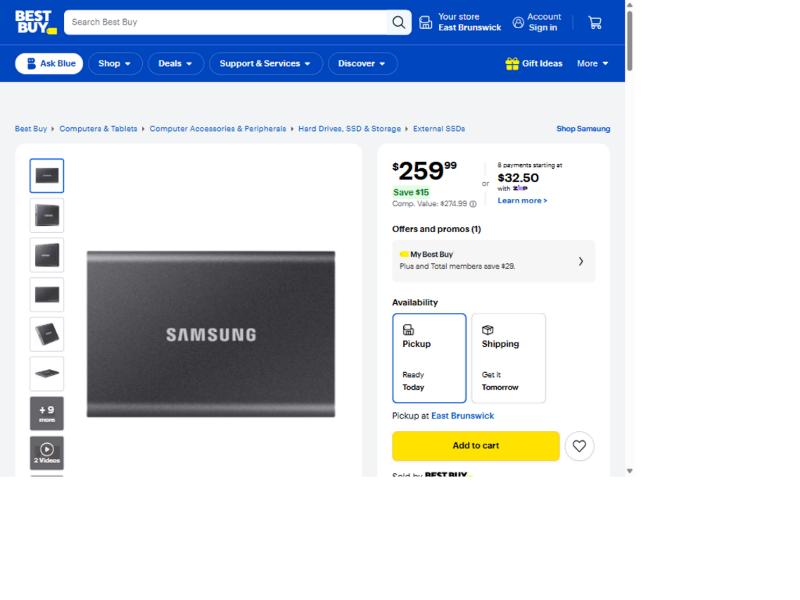
Bought the Samsung T7? Use the Upload a screenshot tab with this Best Buy screenshot. AI vision reads the product, store and price, Channel3 finds the live listing, and the refund always uses the live price, never the one in the image.
- 4
Let the price watch find it
On a paid order, press Check prices now. Matchback looks at the other stores selling the same product; when one is cheaper and passes the same checks, it appears as a one-click claim. On 2026-11-02, 11 of the 12 products had one (all but the Vitamix); prices move, so this can change.
- 5
Be the store
Open the store desk with the merchant key from the Devpost testing instructions. Claims Matchback could not settle alone wait there with their evidence: approve one with a refund amount (it goes through the same guarded PayPal refund) or refuse it, and the shopper's receipt updates. The desk also shows every decision, money refunded and sales kept. Open the console for the same data in AG Studio: Matchback's own widgets (money kept, decision trail, a review queue you can approve from), the evaluation on 75 real listings, and an assistant (Ask AI) that reads the queue, explains a claim and proposes a decision, which only your click confirms.
- 6
Let an AI agent claim
Shoppers' AI assistants can file the claim themselves:
/api/mcpon this site is an MCP server with four tools (read the policy, look up an order, file a claim, follow it). Connect one, for exampleclaude mcp add --transport http matchback https://matchback-tau.vercel.app/api/mcp, then give it your order id (the last part of your order page's address) and a sample link. The agent goes through the same checks and limits as the order page, and it cannot approve a claim, choose an amount or change the store's settings. - 7
Switch language and theme
English, French and Spanish from the header, including the AI's note on new claims; light and dark mode.